For years, the narrative in AI development was monolithic: if you weren’t running an NVIDIA GPU with CUDA, you weren’t serious. The vast majority of machine learning frameworks, libraries, and tutorials were optimized almost exclusively for the green team’s hardware.
Apple users, despite having powerful machines, were largely sidelined. They were stuck using slow CPU-only modes or clunky, half-supportive translation layers to get popular frameworks like PyTorch to recognize their GPUs.
That narrative has shattered. The introduction of Apple Silicon (M1, M2, and M3 chips) changed the hardware game. But hardware needs software to unlock it. Enter MLX, an open-source framework from Apple’s machine learning research team designed specifically for Apple Silicon.
If you are a developer, researcher, or enthusiast looking to run, fine-tune, and develop Large Language Models (LLMs) locally on a Mac, this is the moment you’ve been waiting for. Here is why the combination of Apple Silicon and MLX is a paradigm shift.
1. The Hardware Foundation: The Magic of Unified Memory
Before understanding why MLX is great, we must understand the unique beast that is the Apple M-series chip.
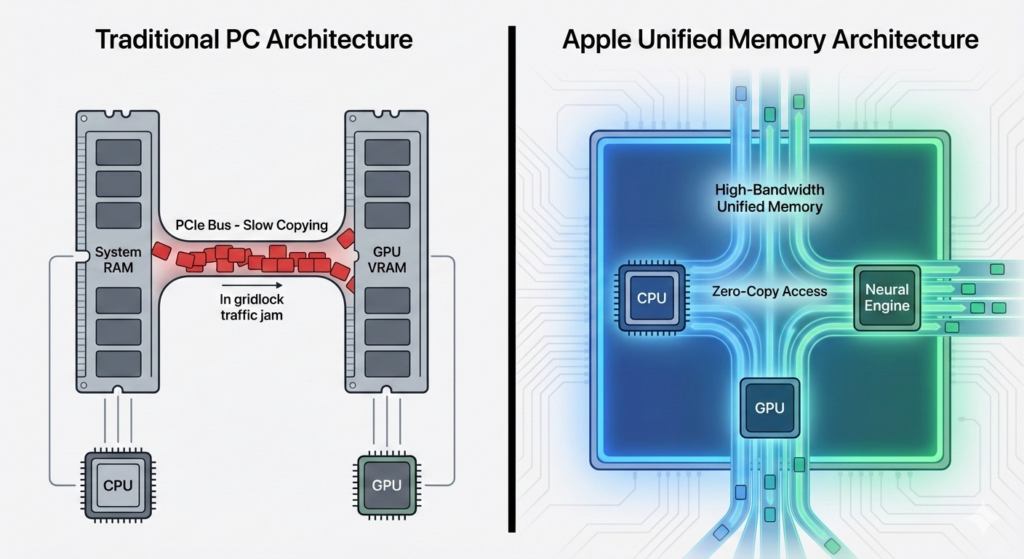
Traditional PC architecture suffers from a “split-brain” problem. You have System RAM for the CPU, and separate Video RAM (VRAM) for the GPU. To train or run an LLM, data must constantly be copied back and forth across a relatively slow bus (PCIe) between these two pools.
This copying is a massive bottleneck. Furthermore, the size of the model you can run is strictly limited by the amount of VRAM on your graphics card, regardless of how much system RAM you have.
The Apple Silicon Advantage: Unified Memory Architecture (UMA)
Apple Silicon uses a Unified Memory Architecture. There is no separate VRAM. The CPU, GPU, and Neural Engine all share a single, massive pool of ultra-fast, high-bandwidth memory.
This means an M3 Max MacBook Pro with 128GB of unified memory effectively has a “128GB GPU.” It can load massive models (like Llama-3 70B quantized) entirely into memory that the GPU can access instantly, without copying a single byte. This is a capability that would cost tens of thousands of dollars in professional NVIDIA datacenter GPUs to replicate.
2. The Software Gap: The Problem with PyTorch on Mac
So, the hardware is incredible. Why wasn’t AI booming on Macs immediately after the M1 launched?
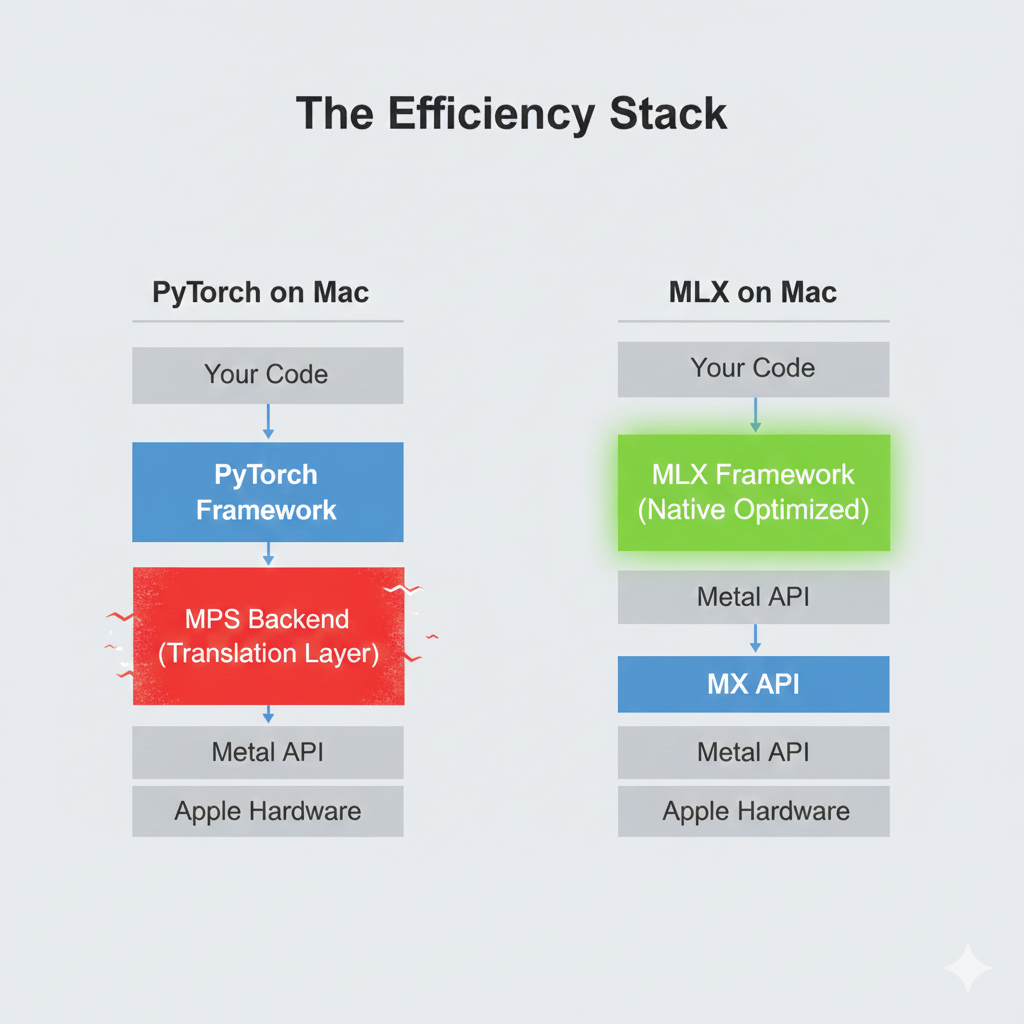
The issue was software optimization. The industry standard, PyTorch, was built for CUDA. While Apple and Meta worked hard to create the mps (Metal Performance Shaders) backend to allow PyTorch to run on Mac GPUs, it remains a translation layer.
When you run a PyTorch model on a Mac, it is effectively trying to translate instructions meant for one architecture into another in real-time. It works, but it often comes with friction:
- Optimizations Missing: Not all PyTorch operations are fully optimized for Metal.
- Memory Overhead: The translation layer itself consumes precious memory.
- Performance Tax: It simply isn’t as fast as “native” code.
It felt like trying to drive a Formula 1 car on a dirt road, the engine is powerful, but the environment isn’t right.
3. Enter MLX: Built Native, Built Fast
In late 2023, Apple quietly released MLX. It is not a fork of PyTorch; it is a new array framework built from scratch specifically for the unique architecture of Apple Silicon.
MLX is designed by researchers who intimately understand how the M-series chips work. It doesn’t need a translation layer because it speaks the native language of the hardware.
Here is why MLX is the superior choice for local LLM development on Macs:
A. The Power of Lazy Evaluation
MLX uses a technique called “lazy evaluation.” When you ask MLX to perform a computation (like multiplying matrices in a neural network), it doesn’t actually do the math immediately. Instead, it builds a “computation graph” a recipe of what needs to be done.
It only executes the math when you absolutely need the final result. This allows MLX to look at the entire “recipe” beforehand and optimize it, fusing multiple operations into a single, efficient GPU kernel. This dramatically speeds up execution and reduces memory usage.
B. True Unified Memory Mastery
While PyTorch can use unified memory, MLX was born in it.
MLX arrays live in unified memory by default. The framework is architected to ensure that when the CPU prepares data and the GPU processes it, zero copying occurs. For LLMs, where you are shuffling gigabytes of weights around for every token generated, this zero-copy architecture is the difference between usable performance and frustrating lag.
C. Familiarity by Design (The NumPy Connection)
Apple knew developers didn’t want to learn a totally alien syntax. MLX’s Python API is designed to be almost identical to NumPy, the bedrock library of Python data science. If you know NumPy, you already know 80% of MLX.
Python
# It feels just like NumPy
import mlx.core as mx

a = mx.array([1, 2, 3, 4])
b = mx.array([1.5, 2.5, 3.5, 4.5])
c = a + b
print(c)
# Output: array([2.5, 4.5, 6.5, 8.5], dtype=float32)
This lowers the barrier to entry significantly compared to learning complex, hardware-specific APIs.
4. Practical Reality: Fine-Tuning and Inference
MLX isn’t just theoretical; it’s highly practical today.
The mlx-examples repository on GitHub is a goldmine. The Apple team has provided high-performance implementations of major models like Llama, Mistral, Phi, and Whisper.
Inference (Running models): Generating text with MLX is blistering fast on M-series chips. It utilizes the hardware so efficiently that thermal throttling is rarely an issue compared to running unoptimized code.
Fine-Tuning (Training): This is where MLX truly shines. Using techniques like LoRA (Low-Rank Adaptation) or QLoRA to fine-tune a model on your own data used to require a dedicated Linux box with massive NVIDIA GPUs.
With MLX, you can easily fine-tune a 7B or even a quantized larger model directly on a MacBook Pro with 32GB or 64GB of RAM. Because of the unified memory efficiency, you can batch significantly more data, making training faster and feasible on a laptop.
Conclusion: The Sleeping Giant Has Awaken
For a long time, AI development on Mac felt like swimming upstream. Apple Silicon provided the muscle, but the ecosystem wasn’t ready.
MLX is the realization of that hardware’s promise. By providing a native, lazily evaluated, and unified-memory-aware framework, Apple has turned the Mac into perhaps the most capable local AI development platform available outside of a dedicated server rack.
For those prioritizing privacy, offline access, and the ability to build and run cutting-edge models without paying hourly GPU rental fees, the combination of Apple Silicon and MLX is not just an alternative it is now the preferred path.